
- Checkout Our latest Blog Collections
Today, almost everyone searches on Google. Whether it is for a person, a business, or a service, people go to Google first. If someone searches your name or your business name, will they find you? Add me to Google and make sure your presence is visible where it matters most.
If your answer is “no” or “I’m not sure,” don’t worry. In this blog, you will learn how to add yourself to Google in a simple and easy way.
Many people think there is a button called “Add Me to Google”. But Google does not work like a phone directory where you just submit your name.
Google shows information that already exists on the internet. So, to appear on Google, you need to create an online presence. Once your information is online, Google can find it and show it in search results.
That means the real answer is simple:
👉 Create content online, and Google will index it.
Now let’s see how to do that step by step.
The first step is to create a Google account. If you already use Gmail, you already have one.
With a Google account, you can access tools like:
Having a Google account makes it easier to manage your online presence.
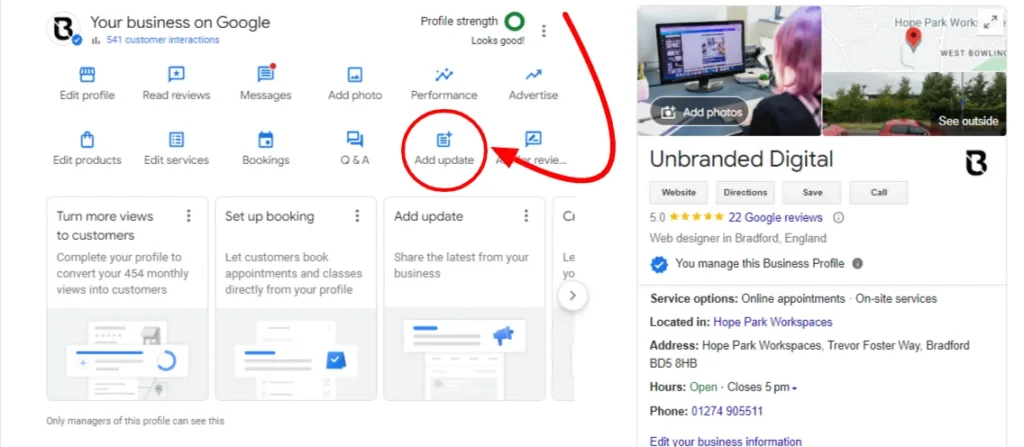
If you have a shop, service, or company, the best way to appear on Google is by creating a Google Business Profile.
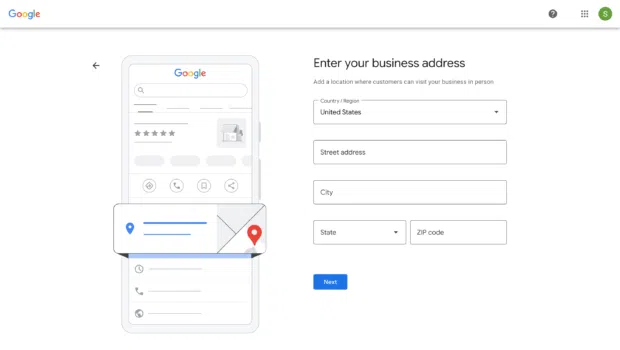
This helps your business appear:
When someone searches for your service in your area, your business can appear with:
This is very powerful for local businesses.
You can create your profile at: https://www.google.com/business/
Fill in correct details, verify your business, and keep your information updated.
Another easy way to add yourself to Google is by creating social media accounts. Google often shows social profiles in search results.
You can create profiles on:
Use your real name or business name. Add a clear profile photo and description. Keep your username consistent across platforms.
When someone searches your name, these profiles may appear on Google.
If you really want to control how you appear on Google, create your own website.
A website can include:
You can create a website using platforms like:
You don’t need technical skills. Many platforms offer simple templates.
Once your website is live, Google will eventually find and index it.
Tip: Use your name in the domain if possible. For example: www.example.com
This helps when someone searches your name.
If you want to appear on Google, use your name clearly and consistently online.
For example:
This helps Google understand who you are and what you do.
Google loves fresh content.
If you have:
Post regularly. Share helpful content related to your work or passion.
The more useful content you publish, the higher your chances of appearing in search results.
For example:
Over time, Google will recognize your online activity.
You can also add yourself or your business to online directories.
Examples:
These listings help Google confirm that you are real and active.
Make sure your:
Consistency builds trust with search engines.
If you have a business, reviews help you appear stronger in Google search.
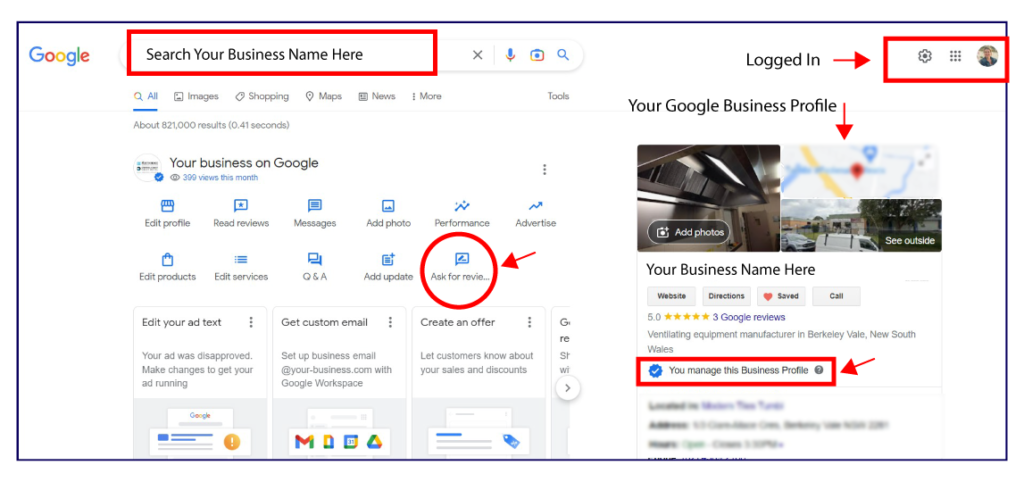
When customers leave reviews on your Google Business Profile, it improves your visibility and credibility.
Good reviews also build trust with new customers.
Always reply politely to reviews — both positive and negative.
Many people ask, “How long does it take to appear on Google?”
The answer is: it depends.
Sometimes it takes a few days. Sometimes it takes a few weeks.
Google needs time to:
Be patient and keep building your online presence.
After creating your profiles and website, search your name on Google.
Try different searches like:
See what appears.
If you don’t see much, keep creating and improving your online presence.
Adding yourself to Google is not about filling out one simple form.
It is about building your presence online.
To quickly summarize:
✔ Create a Google account
✔ Set up Google Business Profile (if you have a business)
✔ Create social media accounts
✔ Build a website
✔ Post useful content
✔ Stay consistent
In today’s digital world, being visible online is very important. Whether you are a student, freelancer, professional, or business owner, showing up on Google helps people find you and trust you.
Start today. Create your online presence step by step.
Soon, when someone types your name into Google, they will find you.
Excellent Work
Certified Team
Quick Turnaround
Most Experienced